


Stories you may like
Computer Repair Technician
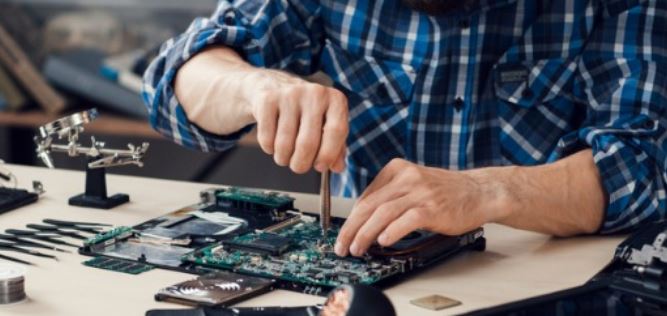
A computer repair technician specializes in fixing and maintaining computers and related devices. These professionals handle issues like broken hardware, software errors, and performance problems. Whether it’s a cracked screen, a virus, or a slow computer, they use their knowledge and tools to identify and solve the problem. Their goal is to make sure the computer works properly and meets the user’s needs.
These technicians work with a wide range of computer components, such as motherboards, hard drives, and keyboards. They may also install new software, upgrade hardware, or set up networks. Depending on the job, they might work in repair shops, at people’s homes, or in businesses. Some computer repair technicians also provide advice on how to prevent future issues and keep computers running smoothly.
Duties and Responsibilities
The duties and responsibilities of a computer repair technician vary depending on the specific job and work environment, but some common tasks include:
- Diagnosis and Troubleshooting: Computer repair technicians start by diagnosing the root cause of computer problems reported by users. This involves listening to user descriptions of issues, asking probing questions to gather additional information, and using diagnostic tools to identify hardware or software malfunctions.
- Hardware Repair and Replacement: Once the issue is identified, technicians perform repairs or replacements on faulty hardware components. This could include repairing or replacing parts such as hard drives, RAM, motherboards, graphics cards, power supplies, and peripherals like keyboards and mice.
- Software Troubleshooting and Installation: In addition to hardware issues, technicians troubleshoot software problems such as operating system errors, driver conflicts, and malware infections. They may perform software updates, patches, and installations to resolve these issues and ensure system functionality.
- Data Recovery and Backup: Computer repair technicians assist users in recovering lost or corrupted data due to hardware failures, accidental deletion, or software issues. They may use specialized tools and techniques to recover data and help users implement backup solutions to prevent future data loss.
- System Maintenance and Optimization: Technicians perform routine maintenance tasks to optimize computer performance and prevent future issues. This includes tasks such as disk cleanup, defragmentation, system updates, and performance tuning.
- Customer Support and Communication: Computer repair technicians provide technical support to users, offering guidance and assistance in resolving computer problems. They communicate technical information in a clear and understandable manner, ensuring users are informed about the status of their repairs and any recommended actions.
- Documentation and Reporting: Technicians maintain accurate records of all repairs, including details of the issue, diagnostic steps taken, repairs performed, and any replacement parts used. They may also generate reports on common issues, trends, and recommendations for improving system reliability.
Types of Computer Repair Technicians
Computer repair technicians can specialize in various areas based on their skills, expertise, and the types of computer systems and devices they work with. Here are some types of computer repair technicians:
- Data Recovery Specialists: Data recovery specialists specialize in recovering lost or corrupted data from storage devices such as hard drives, solid-state drives (SSDs), USB drives, and memory cards. They use specialized tools and techniques to retrieve data that has been deleted, formatted, or damaged.
- Desktop Computer Technicians: These technicians specialize in diagnosing and repairing issues with desktop computers, including hardware and software problems. They may work on both Windows-based and macOS desktop systems.
- Hardware Technicians: Hardware technicians specialize in repairing hardware components of computers, such as hard drives, RAM, processors, graphics cards, power supplies, and peripherals. They have expertise in identifying faulty hardware components and replacing them with new ones.
- IT Support Specialists: IT support specialists provide technical assistance and troubleshooting to users experiencing computer hardware, software, or network issues. They diagnose problems, offer solutions, and ensure that systems are operating efficiently to meet users' needs.
- Laptop Technicians: Laptop technicians focus specifically on diagnosing and repairing issues with laptop computers. They are skilled in disassembling and reassembling laptops to access internal components for repair or replacement.
- Mobile Device Technicians: Mobile device technicians specialize in diagnosing and repairing issues with smartphones, tablets, and other mobile devices. They are skilled in repairing hardware components such as screens, batteries, and charging ports, as well as troubleshooting software issues.
- Network Technicians: Network technicians focus on diagnosing and troubleshooting issues related to computer networks, including wired and wireless networks, routers, switches, and network protocols. They ensure that computers can connect to the network and communicate effectively with other devices.
- Software Technicians: Software technicians specialize in diagnosing and troubleshooting software issues in computers, including operating system errors, driver conflicts, software installation problems, and malware infections. They are proficient in using diagnostic tools and software utilities to resolve software-related issues.
Workplace of a Computer Repair Technician
The workplace of a computer repair technician can vary depending on where they work. Some technicians are based in repair shops or service centers, which are usually equipped with tools, spare parts, and diagnostic equipment. These spaces are organized to help them work efficiently, whether they’re fixing a cracked laptop screen or troubleshooting a software issue. In these environments, they may work on multiple computers at a time and interact with customers who bring in their devices.
Other technicians work on-site at homes, offices, or businesses. In these cases, they travel to the customer’s location to fix issues, set up new equipment, or provide maintenance. This type of work often requires good communication skills, as they explain technical problems and solutions to customers. It also offers variety, as technicians might face different challenges with every visit.
Some computer repair technicians work remotely, especially when troubleshooting software or network problems. Using remote access tools, they can connect to a customer’s computer and fix the issue without being physically present. Regardless of where they work, their workplace is centered around solving problems and ensuring that computers and related devices function smoothly.
How to become a Computer Repair Technician
Becoming a computer repair technician involves the following steps:
- Learn the Basics: Start by learning how computers work and understanding their components, such as motherboards, hard drives, RAM, and CPUs. You can do this through self-study, online tutorials, or enrolling in introductory computer repair courses. Knowing how to troubleshoot common issues is key.
- Get Formal Education or Training: While some technicians are self-taught, many employers prefer candidates with formal education. You can pursue a diploma, certificate program, or even an associate degree in fields like information technology, computer science, or electronics engineering technology. These programs teach essential skills and provide hands-on experience.
- Gain Experience: Seek opportunities to gain practical experience in computer repair through internships, part-time jobs, or volunteering. Look for entry-level positions at tech repair shops, electronics stores, or IT departments where you can learn from experienced technicians and gain real-world experience diagnosing and fixing computer problems.
- Obtain Certifications: While not always required, obtaining industry-recognized certifications can enhance your credibility and marketability as a computer repair technician. Consider certifications such as CompTIA A+, which covers essential skills in hardware, software, networking, and security. Other certifications, such as those offered by manufacturers like Apple or Dell, can also be beneficial, especially if you plan to specialize in repairing specific brands of computers or devices (see below).
- Build a Portfolio: Create a portfolio showcasing your technical skills and experience in computer repair. Include details of any projects, internships, or certifications you have completed, as well as examples of computers or devices you have repaired or upgraded. A portfolio can help demonstrate your proficiency to potential employers or clients.
- Continued Learning: Stay current with advancements in technology and industry trends by participating in continuing education programs, attending workshops or conferences, and obtaining additional certifications as needed. Continuous learning and professional development are essential for staying competitive and advancing your career as a computer repair technician.
Skills needed for Computer Repair Technician
INTERACTING WITH COMPUTERS
Familiarity with computers is at the core of any IT and technician role, especially starting as a computer technician. The more time you spend interacting with computers and mobile devices, the more you will naturally take to the other skills necessary for the role. Become skillful at working with operating systems, software, and settings on a user level, then dive into deeper understanding.
Understand how computers work and how they interact with humans to optimize each task. The best technicians understand how computers function and can adapt their methods based on both the current hardware and the task at hand.
COLLECTING DATA AND INFORMATION
Research is a big part of IT and technical work. There is a great deal of data and information collected from hunting down a hardware problem to determining the right software tools to use. Most technicians can research an unfamiliar bug or behavior at lightning speed. Online resources mean that even seemingly obscure problems can be solved with cross-checked information.
As a computer technician, much of your role will involve diagnosing and repairing problems. The more skilled you are at researching problems and finding solutions, the better your reputation as a technician. You will need to collect all the relevant information to diagnose problems quickly. Great data and information skills can also open doors for data management or IT work in the future.
PROBLEM-SOLVING AND DECISION-MAKING
For any technician, problem-solving is an essential skill. To troubleshoot computer hardware, you will need a significant foundation in problem-solving and careful decision-making. Computers need to be handled in a logical and even-handed way. Combined with understanding how computers work, your problem-solving skills will define how quickly and effectively you can accomplish your technical work.
Decision-making allows you to weigh each option and choose the course that will give the best results. In computer work, this means knowing which course of action will give you information and which will produce an inconvenient result.
COMMUNICATION
Every job requires a certain amount of communication. Whether it’s face to face, on the phone, via email, or instant message, every day, you will be communicating with others. A computer hardware field technician must communicate effectively with clients and co-workers to share information and solve the problems that arise in their everyday life. This means honing your conversation skills as well as your listening and teamwork skills. The actions included range from drafting an email to negotiating. The more experience you have in professional communication, the easier your new role will be.
CONSULTING AND ADVISING OTHERS
As you become a professional computer technician, others may come to you for information or advice on technical issues. You may be providing IT assistance to clients, internal employees or providing consultation for managers who rely on your expertise. For this reason, you should hone your skills in providing consultation and advice to others. Practice both giving consult presentations and being patient with those who are troubleshooting at a distance.
You may be asked to advise management on the best course of action. In this endeavor, apply all your knowledge and experience to help them foresee the IT strategy options along with each potential set of outcomes and effects.
INSPECTING EQUIPMENT, STRUCTURES, OR MATERIAL
Your familiarity with computers should reflect an ability to inspect hardware. Become experienced with the inside and outside of modern computers. Examine internal and external pc parts and practice determining what is wrong with the equipment. The ability to inspect accurately is essential for any hardware computer technician,
You should have a complete and comprehensive understanding of all the equipment you work with and how it works together. If someone asks you what is wrong with a computer, know how to approach the inspection and determine a potential solution.
DOCUMENTING AND RECORDING INFORMATION
Solving computer problems means taking some baseline metrics that will give you critical information. The CPU and RAM usage, processor temp, and network access speed are just a few easily named. No matter what branch of the tech industry you specialize in, you will find yourself documenting, recording, and building a plan from computer information. The more comfortable you are with stats and spreadsheets early, the easier you will learn new troubleshooting processes.
DEVELOPING OBJECTIVES AND STRATEGIES
Computer solutions are always reached with goal-oriented strategies. Hone your skills in developing objectives and building action plans from those goals. Practice building strategies to put your solutions into action. This process works for both short-term and long-term computer solutions, from repairs to network cybersecurity.
As a computer technician, you will need to be on top of frequent maintenance, virus scanning, and network defenses in addition to the health and performance of every computer. Preventative strategies prevent future issues, while objective-driven troubleshooting can quickly repair a system when performance is flagged.
TRAINING AND TEACHING OTHERS
As you rise in the tech career, you may be asked to train others. It doesn’t take long for someone rising above the crowd to be assigned a trainee. Proving your capability even in an entry-level tech job can result in training someone who could use the talent or skill you’ve put into the job. You may also be prompted to help teach non-IT staff how to use the system or protect themselves from cybersecurity threats. So, it’s a good idea to get used to training and teaching now.
Practice explaining things calmly and clearly and re-phrasing your point in three ways to help another person understand. You may practice tutoring by helping out the students in your life if the opportunity arises.
REPAIRING AND MAINTAINING ELECTRONIC EQUIPMENT
Finally, practice maintaining your own electronic equipment and home devices. Open up failed equipment and practice fixing, including harvesting parts to fix it. Become intimately familiar with the interior components of a computer and at ease with switching out the parts. Understanding and maintaining electronic equipment is essential as a tech professional, especially a hardware technician. PCs, laptops, and other mobile devices are complex pieces of machinery. To maintain each device, you will want a practiced skill with repairing and upkeeping the equipment.
Joining the tech career path is easier than many realize. To become a computer technician, focus your efforts on these ten leading skills. Most will improve your technical skills and prepare you for a hardware technician’s tasks and work environment. The rest will lead you to be a highly effective employee in any organization.








User's Comments
No comments there.